
When tax season comes around, most people think about forms, refunds, and deadlines. But there’s one thing many overlook protecting your identity.
With so many online scams these days, the IRS gives taxpayers an extra safety tool called an Identity Protection PIN, or IP PIN.
If you’ve heard about it but aren’t sure what it is, don’t worry. This guide will explain what an IP PIN does, how to get one from IRS.gov, and why it’s important to keep it safe from virus.
What Is an Identity Protection PIN and Do I Need One?
An Identity Protection PIN (IP PIN) is a six-digit number from the IRS that helps stop identity thieves from using your Social Security Number to file fake tax returns. You can think of it like a secret passcode between you and the IRS. Only you and the IRS know it.
You might need an IP PIN if:
- You’ve been a victim of identity theft before.
- The IRS invites you to join the program.
- You just want extra protection for your taxes, even if you haven’t had any problems.
Originally, only certain people could get one. But now, anyone who can verify their identity online through IRS.gov can apply. It’s free and only takes a few minutes.
How to Request and Receive an IP PIN from IRS.gov
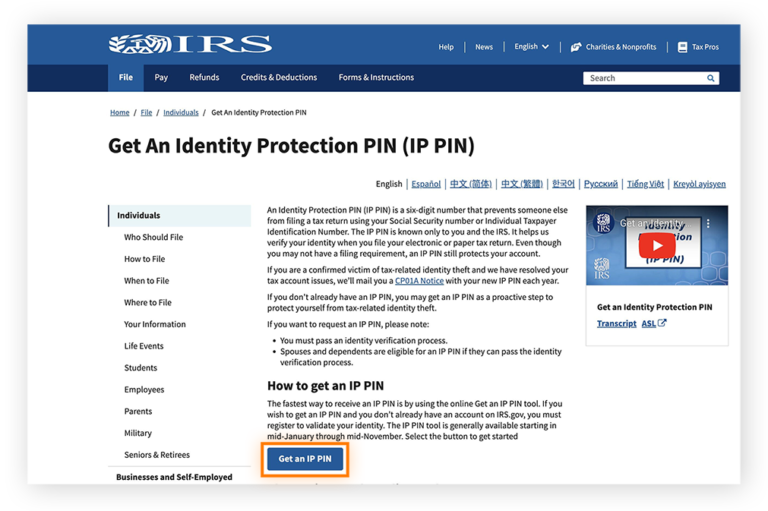
Getting your IP PIN isn’t hard, Here’s how you can do it:
- Go to IRS.gov and search for “Get an IP PIN.”
- Open the “Get an IP PIN” tool.
- Sign in or create an IRS online account. You’ll need to verify your identity using ID.me, which usually means showing your photo ID and taking a quick selfie.
- Once you’re verified, your IP PIN will appear right on your screen.
- Save it somewhere safe — you’ll need it for your next tax return.
If you can’t complete the online steps, you can still apply by filling out Form 15227 and mailing it to the IRS or visiting a local IRS office with your ID.
Is an IP PIN Only Good for Tax Returns Due That Year?
Yes, Each IP PIN only works for one year. Every January, the IRS gives you a new four to six digit PIN. This means even if someone somehow found your old IP PIN, they couldn’t use it again. It’s part of how the IRS keeps your information secure.
Make sure to check your IRS account early each year to get your new IP PIN before you start filing your taxes. Find you IP address in other devices.
How to Retrieve Your IP PIN Online
If you’ve lost or forgotten your IP PIN, don’t panic it happens to a lot of people.
Here’s what to do get retrieve IP pin:
- Go to IRS.gov and log in to your IRS online account.
- Click on “Get an IP PIN.”
- Your current year’s IP PIN will be shown there.
If you can’t log in or verify your identity online, you’ll need to wait for the IRS to mail it to you. They usually send out new IP PINs in mid-January every year.
One important reminder the IRS will never call, email, or text you asking for your IP PIN. If anyone tries, it’s a scam.
How to Get an IP PIN for My Child / Dependent
You can also get an IP PIN for your child or dependent. This is helpful if someone has tried to use your child’s Social Security Number before or if you just want to prevent it from happening.
To do this, you can’t use the online system (it doesn’t support minors yet). Instead, you’ll need to:
- Mail Form 15227, or
- Visit an IRS office in person with your ID and your child’s documents.
Bring your child’s Social Security card and birth certificate, plus your own ID. Once approved, the IRS will mail your child’s IP PIN each year.
Even if your child doesn’t file taxes, having an IP PIN keeps their information safe.
How Do I Find My IP PIN Online?
If you already have an IP PIN but can’t remember it, you can find it easily online.
Here’s how you can find:
- Go to IRS.gov.
- Select “Get an IP PIN.”
- Log in or set up your ID.me account for verification.
- Your current IP PIN will appear as soon as you log in.
Always keep it private. Only you and your tax preparer should know your IP PIN. The IRS will never ask you to share it through email or phone.
Best Practices & Use of IP PIN in Tax Filing
When you file your taxes online or on paper you’ll need to include your IP PIN.
If you file electronically, your tax software will ask for your IP PIN before you submit.
If you file by paper, write it in the space provided on your tax form.
Here are a few smart habits to follow:
- Keep your IP PIN private. Don’t share it with anyone except your tax preparer.
- Store it safely. Use a notebook, password manager, or a secure file.
- Use the new one each year. Old IP PINs won’t work anymore.
- Check your IRS account regularly. This helps you spot anything suspicious early.
Your IP PIN is a small step that adds big protection against tax fraud. Treat it carefully.
Final Considerations
Anyone can have their identity stolen, and it is a significant concern. One of the greatest methods to protect your tax information is to use the IRS IP PIN program.
Setting it up on IRS.gov is free, easy, and only takes a few minutes. No one can submit a phony return in your name without that PIN once you have it.
Getting an IP PIN is a good idea whether you’ve been a victim of fraud before or just want to feel safe. Keep it a secret, change it every year, and keep one step ahead of scammers.
A few minutes today can save you a lot of work tomorrow when it comes to keeping your identity safe.
Frequently Asked Questions
No, Once you’re in the IP PIN program, the IRS will keep sending you a new PIN every year.
You’ll need to verify your identity again using ID.me to reset your account.
No, only you can access it through your IRS account or by mail.
The IRS will reject your return. You’ll have to refile it with the correct number.
No, the IRS offers it completely free.
Create random IPv4 or IPv6 addresses in seconds for testing, networking, or learning. 100% free, fast, and secure no data collected or stored.




