
In a world where data breaches happen almost daily, the idea of creating passwords without storing any data sounds almost magical but it’s not. Modern cryptography, time-based token systems, and deterministic algorithms make it possible to generate secure passwords or access keys without ever saving the actual password.
This guide explains how this works, why it matters, and how you can implement a stateless password system for your app, SaaS tool, or authentication workflow.
Why You Should Avoid Storing Passwords or Secrets
Storing passwords, even hashed, always introduces risk. A database breach, misconfigured cloud bucket, or insider attack can all lead to the exposure of password hashes, salts, and metadata. Avoid common password mistakes which most people do. Although hashing and salting do provide some protection, attackers may still carry out brute-force or dictionary attacks as their next step.
The Risks of Storing Password Data
- Databases can be compromised.
- Password reuse across platforms increases risk.
- Weak hashing systems (MD5/SHA1) are still used by many companies.
- Salts and hashes stored together can still be cracked over time.
What “Without Storing Data” Really Means
A stateless password system means:
- You never store the actual password.
- You never store a hash of that password.
- You never store a salt, token, or related metadata.
- You verify passwords using deterministic cryptographic generation, not storage.
- Stateless systems don’t rely on saving secrets; they rely on reproducible algorithms.
What is Alternatives to Traditional Password Storage
There are multiple ways to create and verify passwords without storing any sensitive data. Most of these methods come from cryptography, token-based systems, and challenge response mechanisms.
Time-Limited Passwords (TOTP, HOTP, Timestamp Keys)
These systems generate a password using:
- A secret seed
- A time interval, counter, or timestamp
- A hashing algorithm
- The server only needs the same algorithm and seed, not the password to verify the user.
- This is how Google Authenticator, banking apps, and WebAuthn-like systems work.
Hash Chains (Lamport’s OTP System)
A hash chain works like this:
- Generate a secret.
- Hash it repeatedly (e.g., 1000 times).
- The final hash is stored (only once).
- Each login uses the previous hash in the chain.
The server verifies by hashing the user’s value once and checking if it matches the stored one. After verification, the server updates to the new hash. This works with minimal storage, and no password is ever stored.
Client-Side Derived Passwords (Deterministic Password Generators)
This method uses:
- A master secret
- A domain name
- A counter
- A deterministic hashing algorithm
The same password is generated every time using math, not storage. The server doesn’t store the password; it verifies using the same derivation.
How to Build a Stateless Password System (Step-by-Step)
Let’s break down how to design a passwordless system that is fully functional.
Step 1: Define the Secret or Seed
Your system needs a private seed. This seed is not the password, it’s a base input for generating temporary passwords.
It must be:
- Random
- Long
- Never exposed to users
For example:
7d98abefc09c1d33a67cd91afe23b189
Step 2: Choose Your Algorithm
You can use:
- HMAC-SHA256
- HMAC-SHA1
- HOTP / TOTP
- PBKDF2
- bcrypt / scrypt (if using challenges)
The goal is deterministic generation: same input = same output.
Step 3: Use Time, Counter, or Device Signature
This gives each generated password a unique context.
Example input structure:
password = HMAC_SHA256(seed + timestamp)
or
pass_key=HMAC_SHA256(seed + login_counter)
Step 4: Generate a Unique or Session-Based Password
It might look like this:
A3x9KF87Ls
You never store this value. You only regenerate it during verification.
Step 5: Verify Without Storing
To verify:
- User input their temporary password.
- The server regenerates the expected password using the same algorithm.
- If match → access granted.
- This means the actual password never exists as stored data.
How to Create a Random Password?
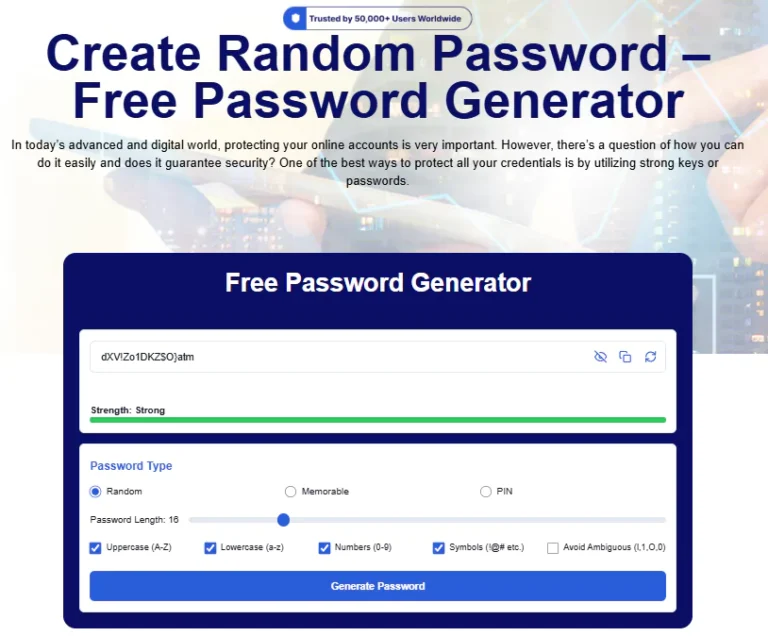
Creating a secure password with CreateRandomPassword.com is fast, simple, and fully customizable. Follow these steps to generate a strong, unique password for any account:
Open the Free Password Generator on CreateRandomPassword.com.
In the Password Type section, select Random for maximum security.
Use the Password Length slider to choose your desired character count. For best protection, aim for 12–20 characters.
Enable the character options you want:
- Uppercase (A-Z)
- Lowercase (a-z)
- Numbers (0–9)
- Symbols (@#& etc.)
- Optional: Avoid Ambiguous to remove confusing characters like 1, l, O, 0.
Click Generate Password and instantly get a strong password in the box above.
Check the Strength Bar to make sure it shows “Strong” in green.
Use the Copy icon to copy the password, or the refresh icon to generate a new one if needed.
Save your password in a secure password manager for future use.
These simple steps ensure you always create strong, random passwords that protect your online identity and digital accounts. Top 10 best password generators in 2026.
Best Practices For Security When You Don’t Store Passwords
Stateless password systems are powerful but only when implemented properly.
Use Strong Algorithms
Avoid:
- MD5
- SHA-1
- Home-grown algorithms
Use:
- HMAC-SHA256
- PBKDF2-HMAC256
- bcrypt or scrypt (for challenge-based systems)
Protect the Secret Seed
The seed is the backbone of your system. Store it:
- In a secure vault
- In an encrypted environment variable
- In hardware security modules (HSM) if available
Add Rate Limiting
- Even stateless systems can be brute-forced.
- Rate-limit attempts or use bot detection.
Don’t Let Timestamps Drift
If using time-based generation, ensure time sync using NTP or similar tools.
Implement Recovery Logic
If passwords aren’t stored, recovery becomes different.
You must rely on:
- Email verification
- Backup codes
- Device tokens
When Stateless Password Systems Are Useful (and When They Aren't)
Great Use Cases
- Temporary access codes
- API validation
- One-time login links
- Passwordless systems
- Device-based authentication
- IoT device validation
- Enterprise internal tools
Not Great For
- Large consumer login portals
- Complex multi-device account systems
- Apps requiring long-term password memory
- Anything requiring password resets stored historically
- In some situations, not storing data causes more friction than it solves.
User Experience in Stateless Systems
A stateless password system must also be user-friendly.
Avoid Confusing Users
Be clear that:
- The password changes
- The system uses temporary keys
- No password is stored
Offer Backup Options
Because stateless means:
- No saved password
- No stored credentials
You should offer
- Reset tokens
- Backup email codes
- Device-based login keys
Keep It Simple
Users should only see:
- A field to enter a code
- Clear regeneration instructions
- A visible countdown if using time-based codes
Summary & Action Plan
Here’s the quick recap:
Key Concept
- You can generate passwords without storing them.
- Use seeds, timestamps, or counters + cryptography.
- Stateless verification means no password storage risks.
Actionable Steps
- Define a secure secret seed.
- Choose a deterministic algorithm.
- Generate passwords via time or counter.
- Verify by regenerating never by storing.
- Add rate limits, recovery, and good UX.
Final Considerations
A stateless password system reduces database risk dramatically. By not storing any passwords, there won’t be any password breaches in the future. If the application is well-designed, it will be one of the most secure user authentication methods available today.
Frequently Asked Questions
By regenerating the expected password using the same cryptographic formula your system uses.
Then the entire system collapses. This is the most important thing to secure.
TOTP (Time-based One-Time Passwords) or HMAC using timestamps.
No, they are typically one-time or session-based.
Zero attack surface for password leaks.
Protect your online accounts with strong, random passwords. It’s 100% free, and we never save or share your data.




