
Have you ever experienced a situation where someone called you but their number was not shown? For instance, you might receive a call that shows up as “No Caller ID,” “Private Number,” or “Unknown.” In any case, whether you are making a phone call in a discreet way, guarding your phone number’s identity as a matter of course, or just wanting to keep your phone number private for any personal purposes, knowing how to call someone with no caller ID will be an incredible asset to you.
To illustrate, you might get a call that reads “No Caller ID,” “Private Number,” or “Unknown Caller.” No Caller ID, Private Number, or Unknown Caller are terms used for calls where the identity of caller is kept secret from the recipient. But is it really that so? Also, what is the legal and responsible way of making these phone calls?
Now, let us go through all aspects of no caller ID calls, such as their operation, how to place them, and what to think about when using that feature.
What Does “No Caller ID” Mean?
When your phone displays “No Caller ID” or “Private Number” during an incoming call, it indicates that the person calling has made a deliberate decision to keep their number concealed from your phone.
This was accomplished by the use of a technique called caller ID blocking, which prevents the receiving phone network from revealing the number of the caller.
The following are the general meanings of these terms:
- No caller ID: The caller deliberately conceals their number prior to the call.
- Private number: This is akin to no caller ID; it was a decision taken to render the number invisible.
- Unknown number: The number is not visible or recognizable by the network (this is often due to technical reasons).
Therefore, when you are pondering what no caller id meaning, it is merely a call in which the caller’s number was not displayed.
Why People Use No Caller ID
There are several reasons someone might prefer the use of a no caller ID or private number:
Privacy:
Many people do not want their partner, spouse or children to find out about their inquiries, surveys or work calls.
Business:
Companies use no caller id or private features to conceal their agents’ personal phone numbers when calling customers.
Testing and Development:
Some developers and members of QA teams may use a no caller ID number to test phone calls within the application.
Avoiding Unwanted Callbacks:
If you are calling someone once and do not want them to return the call for the conversation to continue, you may want to try the no caller ID feature.
It is important to note that no caller id can also be used in an irresponsible manner. People who use it to harass others, or scam them may face charges or legal action for these behaviors.
How to Call Without Caller ID (Method 1: Using Your Phone Settings)
The most straightforward means of making an anonymous call is to employ the call settings on your mobile phone. A minimal of three uncomplicated steps would be all that one requires to make such a call on an iPhone or an Android phone.
Setting For iPhone Users:
- Launch the Settings app.
- Phone is the option that you should scroll down to and then choose it.
- Tap Show My Caller ID.
- The off switch should be turned on.
Thus block spam calls on iphone, every time you call, the person on the other end will see No Caller ID indicated.
Setting For Android Users:
- Launch the Phone app.
- On the top right side, tap the three dots menu.
- Navigate to Settings→ Supplementary services→ Caller ID.
- Opt for Hide number.
Now you should be able to make a call that does not reveal your phone number and that hide Caller ID on the number every time you call.
If you frequently need to make calls to private numbers or require a certain degree of confidentiality for business reasons, then this is a very good technique to use.
How to Call Without Caller ID (Method 2: Using Dialing Codes)
If you want to conceal your phone number temporarily and not mess with your phone settings for good, then dialing codes is the way to go as a quick option to have your number hidden:
Use *67 (For the US and Canada)
Example:
*67 123-456-7890 This is going to be displayed as No Caller ID or Private Number.
Use #31# (For Global Carriers)
Example:
#31# 9876543210
This is a fast and easy way to get No Caller ID phone calls whenever you feel like it without having to change your phone settings permanently.
How to Use Apps or Virtual Numbers to Call Without Caller ID
If your lifestyle often requires you to make no-caller-id calls, using a virtual number app can be easier and more secure.
Popular Apps That Offer No Caller ID or Private Calls:
- CallHippo: for business; hide or customize your caller id.
- JustCall: use virtual numbers for marketing or support calls.
- Five9: enterprise calling system with caller privacy features.
- Google Voice: secondary numbers for private or business calls.
These apps do a good job of balancing privacy while keeping you compliant with business laws. The virtual calling apps are very useful for remote teams, freelancers, or marketers wanting to manage private number phone calls.
How to Call Back a No Caller ID Number
So, you missed a call from a no caller ID and want to find out who it was?
Unfortunately, you can’t just return the missed call since it is hidden. But you do have a few options:
Call Return Codes:
In the US, you can try *69 immediately after the missed call. The service will automatically return the last call; however, this will not work with hidden numbers.
Carrier Phone Provider:
Some carriers can track the call if it is annoyingly persistent.
Call Tracing (57):
If you feel a call from a no caller id was very suspicious, you can dial *57 right after the call and request whether you need to make a report with supporting information. A tap will record the number for legal reasons and provide it to the proper authorities.
Third-Party Apps:
There are some third party apps such as Truecaller or Trapcall that can reveal the hidden number to you at times.
If you are specifically looking for a no caller id, most of the time your carrier or a detailed tracing service will be your best method of tracking a no caller id.
What is Risks of Using No Caller ID
While there are appropriate options for using no caller ID calls, there may also be some downsides:
- Legal Restrictions: There may be some countries that restrict or monitor anonymous calls.
- Spam Identification: Private calls made to people often lead carriers to deem that private calls may be spam.
- Blocked Calls: Many people will simply block spam calls without caller ID or no caller ID.
- Trust Issues: Someone may not answer your call as they are wary of privacy when being contacted.
Use no caller ID techniques responsibly even if it is for business or personal reasons as it is still an invasion of privacy.
How to Block or Avoid No Caller ID Calls
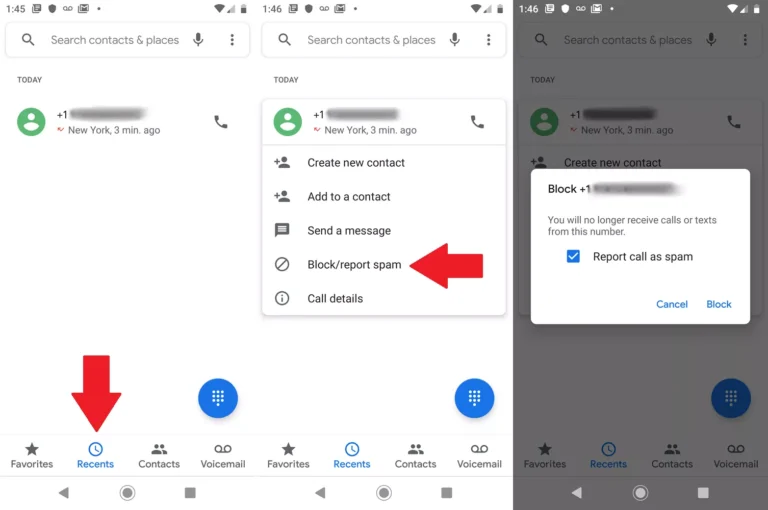
If you’re not always happy with receiving calls from no caller id numbers, there are a number of ways to block them.
Block For iPhone Users:
- Select Settings → Phone → Silence Unknown Callers.
- Toggle the switch on.
- This will automatically send calls from unknown or hidden numbers to voicemail.
Block For Android Users:
- Access the Phone App → Settings → Block Numbers.
- Toggle on Block unknown/private numbers.
You may also want to try call blocking apps such as:
- Hiya
- Truecaller
- Call Control
These help you manage no caller id calls and handle spam more effectively.
Ethical Ways to Use No Caller ID
If you are considering making calls with a private number, it’s better to think about the ethical implications first as they are quite significant:
- Making private number calls only for the reasons of privacy or testing functionality, and do not treat the service as an occasion to deceive or mislead someone.
- If the phone call is work-related, state your name clearly as soon as the other party picks up the call.
- Also, do not call someone over and over or annoy them with unwanted calls, as the repercussions may increase rapidly.
Be very careful when you are using your phone with a private number. You can be truthful if the situation demands it, especially if you are calling someone for work.
Final Considerations
Making a private number call is purely for the purpose of creating privacy and not solely for the sake of abusing one’s anonymity and tracking the no caller IP.
Learning how to make a call with a restriction on providing caller ID means you now control your aspect of privacy, whether it’s about sharing sensitive information, testing an application, or making a business call where you want the details to be kept private. Changing your phone settings, using dial codes like ‘*67’, and also using reliable applications like CallHippo, Five9, or JustCall are some ways you can do this.
However, always remember that with privacy comes accountability. You have to learn how to download in safe mode to security. Use your no caller ID calls in a responsible and ethical manner to protect both your privacy and your reputation.
Frequently Asked Questions
When you see No Caller ID, it means the caller intentionally hid their phone number before making the call. It’s often done using settings or codes like *67 or #31#.
You can hide your number by turning off Show My Caller ID in your phone settings or by adding *67 (in the US) or #31# (in other countries) before dialing.
Yes, at times with programs like TrapCall, call tracing (*57), or getting in touch with your carrier. But not every hidden call is detectable.
Yes, when used for business or reasons of privacy, it is lawful in the majority of countries. However, it is strictly forbidden and illegal to use it for fraud or harassment.
Protect your online accounts with strong, random passwords. It’s 100% free, and we never save or share your data.




