
Cleaning your email list is one of the most underrated yet critical aspects of successful email marketing. Invalid, fake, or spam-trap email addresses have the power to ruin your deliverability, consume your resources, and even cause your most appealing content to end up in the junk folder. Discover the step-by-step process in an easy to remove fake emails that’s actually quite simple to follow, to get rid of fake emails, maintain a healthy list, and safe-guard your brand’s reputation.
What Are Fake Emails?
Fake emails may appear innocuous (after all, what harm can “some bad addresses” possibly cause?), but the effect is not. Here’s why you should be concerned:
- Disposable or throwaway emails (used once and discarded)
- Typos in addresses (such as gmal.com instead of gmail.com)
- Role-based addresses (such as info@ or support@)
- Spam traps installed by internet service providers
- Spoofed sign-ups done by bots
You may not even know it, but any list will have some of them. And though it might not seem like a big deal, spurious emails can wreak havoc in the long run.
Why You Should Remove Fake Emails
Here’s why it’s important to clean your list from fake emails:
- Maintain Deliverability: ISPs track bounce rates and spam complaints. Too much spurious emailing makes your domain suspicious.
- Save Money: Most email platforms charge subscriber numbers. Why pay for non-existent or spam addresses?
- Boost Engagement: Eliminating inactive and fake users raises your click-through and open rates.
- Evade Spam Traps: Fake emails are sometimes traps meant to catch dishonest senders or spammers. Striking them negatively impacts your reputation alway send secure email.
Numerous marketers come to know too late that their campaigns are not doing well just because they never cleaned out spam or fake addresses in the early stages.
Why Fake Emails Keep Showing Up on Your List
By knowing how fake emails get added, you can avoid them later:
- Typos: Manually entered email users frequently err.
- Bots and spam signups: Scripts probe or exploit signup forms.
- Inactive or old subscribers: People change email addresses frequently.
- Purchased lists: Don’t buy them; they’re typically full of spam or expired contacts.
- Pharming emails: Some are specifically designed to steal your information or harm sender scores.
It’s simpler to prevent the behaviors once you recognize them.
How to Identify Fake or Invalid Emails
If you’re not sure whether an address is real or not, here’s how to find out:
Check for Syntax Errors
Look for obvious misspellings, extra spaces, or missing “@” symbols. Simple mistakes are the easiest to spot.
Use Email Verification Tools
Look for obvious misspellings, extra spaces, or missing “@” symbols. Simple mistakes are the easiest to spot.
Monitor Bounce Reports
If your bounce rate is higher than 2%, your list likely contains fake or invalid addresses. Most platforms mark “hard bounces” automatically and make sure you remove them.
Analyze Engagement Metrics
Contacts who have not opened or clicked your emails in several months may be fake, inactive, or spam traps.
Check “Removed Is It Legit?” Cases
Whenever you are unsure whether to delete an email address, ask some questions:
- Was this address entered via double opt-in or verified?
- Did this contact ever engage (open/click)?
- Could this be a real subscriber but just inactive?
- If I leave it in, will it harm deliverability or incur cost?
If you answer “no” to these, you may decide to remove or at least suppress it.
How to Remove Fake Emails from Your List (6 Step)
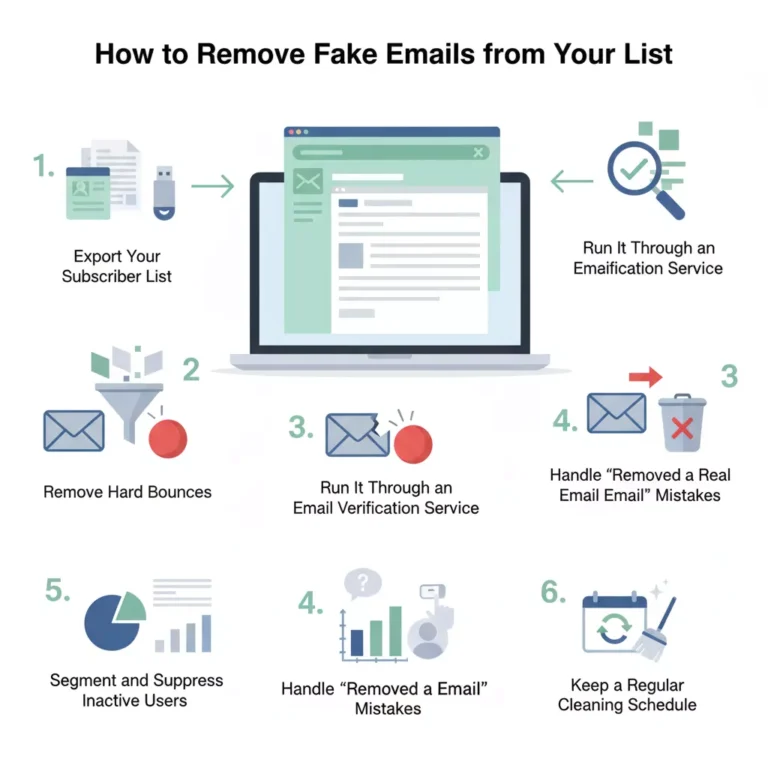
After you’ve flagged the suspicious addresses, here’s a step-by-step guide to remove them accordingly.
Step 1: Export Your Subscriber List
Export the list from your email marketing software (such as Constant Contact or Mailchimp) in CSV format.
Step 2: Run It Through an Email Verification Service
Run the list through a solid tool that will identify invalid, disposable, or risky emails. Most platforms assign addresses as valid, risky, or invalid delete the invalid addresses right away.
Step 3: Remove Hard Bounces
Hard bounces show that the address does not exist. Flag them as removed spam to avoid resending later.
Step 4: Handle “Removed a Real Email” Mistakes
If you by chance have removed a genuine email, do not fret. Have the contact re-subscribe through your opt-in form that has been verified in order to be sure they’re real.
Step 5: Segment and Suppress Inactive Users
Instead of eliminating at once, archive unengaged contacts into a “re-engagement” list. If they remain inactive after some campaigns, eliminate them for good.
Step 6: Keep a Regular Cleaning Schedule
Clean your list every 3–6 months. Consistency in doing so maintains your deliverability high and reputation strong.
Constant Contact Now Making It Harder to Remove Fake Emails
In recent updates, Constant Contact and similar platforms have added stricter list-management policies. While this helps ensure compliance, many users find it harder to remove or verify fake contacts quickly.
Here’s why:
- Automatic suppression rules: The system sometimes keeps unverified or bounced emails in “inactive” status rather than deleting them.
- Permission checks: To avoid deleting real users, Constant Contact may hold some “removed fake” addresses for review.
- Deliverability controls: Their algorithm aims to reduce false removals, ensuring real subscribers aren’t lost.
- However, this change means marketers must actively monitor lists instead of relying on automation alone.
The key takeaway? Don’t depend entirely on your email service provider to run periodic manual checks to ensure fake and spam addresses are gone for good.
Document Your Process
- Maintain a log of cleaning dates, list size before/after, bounce/spam rates.
- Preserve a record of why contacts were removed (hard bounce, role-based, inactive).
If you ever get asked (by auditors, compliance, or mailbox providers), you have proof you practice list hygiene.
Preventing Fake Emails in the Future
Cleaning is helpful, but prevention is even better. Here’s how to prevent fake signups before they end up on your list.
1. Use Double Opt-In
After registration, send a confirmation email that asks users to confirm their address. This easy step helps ensure that only actual people sign up.
2. Block Disposable Emails
Use filters or APIs that detect temporary domains like “mailinator.com” or “tempmail.net” or disposable emails Improve your privacy.
3. Add CAPTCHA to Forms
Deter bot signups with reCAPTCHA or invisible CAPTCHA verifications.
4. Validate Emails at Signup
Instantly check for typos or invalid domains before accepting submissions.
5. Never Buy or Rent Lists
These lists usually include thousands of phishing or fake emails that can ruin your domain reputation in one night.
6. Monitor Engagement Regularly
Unopened emails for more than 90 days? That’s a sign to re-engage or remove them.
Best Practices Technical & Deliverability
To keep your sender reputation healthy and avoid going into spam folders, keep these technical tips in mind:
- Authenticate Your Domain: Implement SPF, DKIM, and DMARC records.
- Beware Spam-Trigger Terms: Terms such as “free,” “guarantee,” and “limited offer” in subject lines are problems.
- Warm Up Your Domain: Phase in sending volume for new campaigns.
- Spam Score Check: Use tools such as Mail-Tester before sending.
- Phishing Email Vigilance: Train your team on recognizing bogus sender names or links appearing suspicious.
Metrics to Track After Cleaning Your List
After removing fake emails, monitor these performance indicators:
- Bounce rate: Should drop below 2%.
- Open rate: Should increase by 10–20%.
- Click rate: Higher engagement = healthier list.
- Spam complaints: Keep below 0.1%.
- List growth: Aim for steady, verified signups.
Common Mistakes to Avoid
Even with the best intentions, marketers often make these errors:
- Accidentally removed a real email and didn’t re-verify it.
- Ignored bounce reports for months.
- Used purchased or scraped lists.
- Forgot to authenticate the sending domain.
- Didn’t test emails for spam content.
Avoiding these mistakes ensures that only legitimate users stay in your contact base.
Quick Checklist to Remove Fake Emails
- Export and back up your list.
- Use a trusted verification tool.
- Delete invalid or bounced addresses.
- Segment inactive subscribers.
- Re-engage or remove unresponsive users.
- Implement double opt-in and CAPTCHA.
- Repeat cleaning every 3–6 months.
Follow this simple routine and you’ll never have to worry about fake or phishing emails ruining your campaigns again.
Final Considerations
Spam and fake emails can be considered very silently and effectively as the biggest killers of both deliverability and engagement. Regularly cleaning your list, verifying new subscribers, and having strong anti-spam practices in place are the ways to protect not only your audience but also your brand as well.
If you’ve only deleted a couple of, or even thousands of, fake contacts, keep in mind that a smaller, authentic list will always be more effective than a large, fake one. Remove fake emails from your system, start today, and enjoy higher open rates, better trust, and a cleaner reputation.
Protect your privacy online with temporary, random email addresses. Use them for sign-ups, testing, or avoiding spam no data stored or tracked.




